
Each month HMS sends the municipality an Excel file with the housing benefits it has granted. This import reads that file and writes the figures into the open housing benefit contract and application of each kennitala, so the special housing support can be calculated from up-to-date numbers.
What the import does not do
It never creates clients or contracts. People in the file who have no open housing benefit contract are only listed in the result.
It never changes the status of a contract.
It does not touch the Start Date of the contract.
Before you start
-
Setup: Service Setup → Housing Benefits → Housing Benefit Service Type must point to the type of service used for housing benefits (usually HSLB). If only one type of service has System = Housing Benefits, the field fills itself the first time you run the import.
-
Contracts: every person in the file needs an open contract of that type (status not Refused or Completed). Create missing contracts the normal way before importing.
The file from HMS
Use the file exactly as it comes from HMS. The import checks the header row before reading anything and stops if the column layout differs.
|
# |
Column |
Used |
Notes |
|---|---|---|---|
|
A |
Kennitala |
Yes |
9 or 10 digits. A dropped leading zero is restored. |
|
B |
Raðnúmer |
– |
Read past |
|
C |
Mánuður / Tímabil |
– |
Read past |
|
D |
Nafn |
Yes |
Only written if the contract has no name |
|
E |
Lögheimili |
Yes |
Only written if the contract has no address |
|
F |
Heimilisfang leigjanda |
Yes |
|
|
G |
Fjöldi heimilismanna |
Yes |
Whole number |
|
H |
Heildareignir |
Yes |
Amount, 0 when none |
|
I |
Heildartekjur |
Yes |
Amount, 0 when none |
|
J |
Upphæð greiðslu |
Yes |
Amount, 0 when none |
|
K |
Leigufjárhæð samkv. samningi |
Yes |
Amount, 0 when none |
|
L |
Leigusamningur frá |
– |
Read past; the contract keeps its own Start Date |
|
M |
Leigusamningur til |
Yes |
Date as dd.MM.yyyy, may be blank |
|
N |
Tegund húsnæðis |
Yes |
|
|
O |
Fastnúmer |
Yes |
With or without a leading F, max 7 characters |
|
P |
Síðasta staða |
– |
Read past |
|
Q |
Tegund |
– |
Read past |
Rules for a row to be imported: the kennitala must be valid, amount cells must contain a number (HMS writes 0, an empty cell means missing data), amounts must not be negative, and the date must be readable. A row that breaks a rule is skipped and shown with the reason; the other rows are still imported.
Where to find it
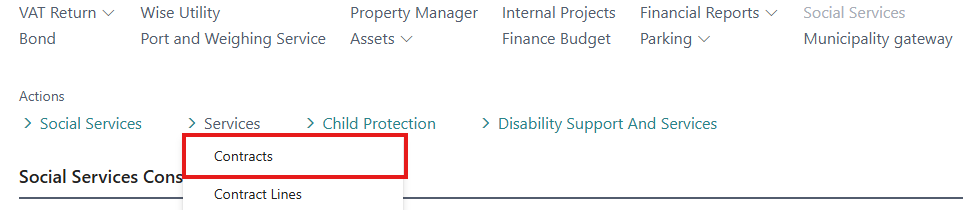
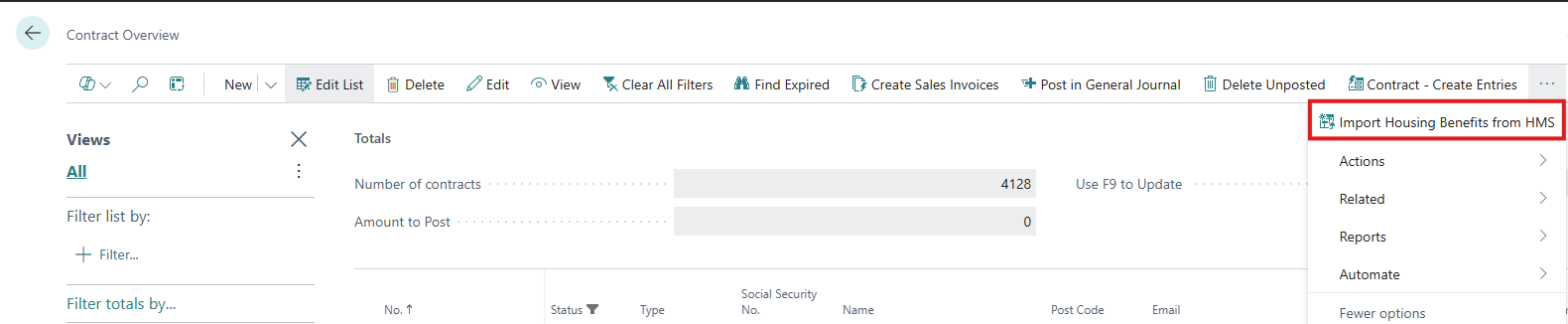
Contract Overview → Process → Import Housing Benefits from HMS
You can also search for "Import Housing Benefits from HMS" with Tell Me (Alt+Q).
Step by step
-
Open Contract Overview and choose Import Housing Benefits from HMS.
-
The dialog shows the type of service that will be used. Press OK.
-
Pick the Excel file from HMS.
-
Confirm the number of rows read from the file.
-
Wait for the progress bar. Rows are saved one by one, so an error in a single row does not undo the rest.
-
Read the summary: how many contracts were updated, how many people had no contract or application, and how many rows were skipped.
-
The result page opens with one line per row. Click a contract number to open the contract.
What gets filled in
|
Excel column |
Written to |
On |
|---|---|---|
|
Leigusamningur til |
Expiry Date and Contract Closes on |
Contract and application |
|
Fjöldi heimilismanna |
No. of Household Members |
Application |
|
Heildareignir |
Net Asset |
Application |
|
Heildartekjur |
Yearly Income with Insurance Benefits |
Application |
|
Upphæð greiðslu |
Housing Benefit Amount |
Application |
|
Leigufjárhæð samkv. samningi |
Rent Amount |
Application |
|
Tegund húsnæðis |
Housing Type |
Application |
|
Fastnúmer |
Property ID |
Application |
|
Heimilisfang leigjanda |
Property Description |
Application |
|
Nafn, Lögheimili |
Name, Address |
Contract, only if blank |
A contract without an application record gets one created. If a person has several open contracts of the type, the one with the latest Start Date is updated.
Reading the result
|
Action |
Meaning |
What to do |
|---|---|---|
|
Updated |
Contract and application were written |
Nothing |
|
No contract or application found |
No open housing benefit contract for this kennitala |
Create the contract if the person should have one, then import again |
|
Skipped |
A value in the row could not be read; see Error Text |
Fix the cell in the Excel file and import again |
The import can safely be run again with the same or a corrected file. Rows already imported are simply written again with the same values.